We discussed her books, including the latest, Brand Up 2.0; and the changes that are rocking the PR world.
Stacey and I compared notes and offered advice for agency and internal comms teams. There are a number of challenges, true; but each presents new opportunities:
AI: how is it helping, hurting, what should PR teams do?
Changes in media landscape, blurring lines of paid and earned.
Emergence of alternative media channels.
The importance of thinking holistically, and integrating with other marketing channels.
Measuring and achieving the results that really count.
Thank you, Stacey, for joining the pod!
Check it out for great insights and actionable tips, on Spotify and other podcasting channels:
Awhile back, I wrote about the Web and social media-driven changes rocking PR; back then, some called it a death blow. I called it PR’s moment of truth.
Fast forward to today (PR, not dead yet!). Now, AI represents another existential inflection point.
It is already having an impact, in good and bad ways. So what’s the deal, is it the proverbial best of times or worst of times for PR, given AI’s sudden and dramatic rise?
The article highlights the perils of the tech, citing an AI-generated pitching campaign that crashed terribly. It also mentioned efforts of PR agencies and enterprise comms teams to put the tech to more useful and productive work. Examples include generative optimization models that can influence LLMs; and using AI to assist with crisis and media monitoring and responses.
Many startups are entering the fray, and content generation seems to be a very popular application of AI in PR. This also presents challenges as the tech can generate and amplify crap content incrediblty easily (or “drive the cost of bullshit to zero”).
According to the WSJ story:
AI has complicated the jobs of PR people… The technology made email outreach less effective by encouraging an ever-larger deluge of spam messages…”
stop and read this. google i/o just changed pr. i’ve never said this louder.
Sarah Evans
She added: “Sundar Pichai‘s keynote (which i watched twice and transcribed) sent a clear signal: generative ai will rewrite how brand visibility, media, and public trust are shaped.if you’re in pr, or rely on it, here’s what you need to know.”
The post was all about the need to AI search optimize content, something I discussed with SEO guru Mark Traphagen when we was last on our PR Done & Doner podcast. Sarah’s post is decidedly bullish on prospects for PR, e.g. she says:
“💡 what this means for cmos and ceos: pr is your brand’s engine across search, social, and dark social.”
It’s hard to know what to make of all this. Just when we think we have it all figured out, we may get shaken up and turned inside out, that’s how fast the tech is progressing. So be wary of people who say they have all the answers, and silver bullets in the form the latest AI-powered PR tech.
Watch this blog, I’ll be posting more about AI developments and PR tactics that work today in light of all the changes that are shaking up our field.
It was great having Kourtney Jason on the podcast. She was an entertainment journalist before launching and growing book publicity and digital marketing agency Pacific and Court.
Kourtney offered advice on how to improve media relations and results.
We discussed top tips, such as:
How to succeed in a changing media landscape.
The growth of alternative media channels, and how to best identify and pursue them.
Honing outreach based on timing, freelance vs. staff writers, headline consideration.
Thinking outside the email pitch box
A new media opportunity alerting service
Hacks for finding journo emails
The importance of research to understand an outlet’s voice.
Thank you, Kourtney, for sharing your insight with our audience, and thanks , listeners, for tuning in. You can reach Kourtney at:
Some things never seem to change in PR, despite the radically different media and info landscapes that exist today.
E.g., many or most in the business still lean heavily on traditions like newswires, press releases and email pitches. When everyone’s shouting from the rooftops using the same tools and tactics, how can you break through? That was a question from my last post, and one we aimed to answer on the latest PR, Done and Doner podcast.
While some may take a dim view of hype and PR stunts, these things featured front and center. It was a wide-ranging conversation covering the following points:
Hype history
Edward Bernays, PR inventor and hype artist
The cornerstones of ethical hype
Creativity hacks
We also answered questions like:
Who invented the ribbon-cutting ceremony?
What do Warren Buffet and Charles Manson have in common?
These are just some of the things you’ll learn from the podcast. Thank you for reading, and hope that you check it out. And thanks, Michael and Joe, for joining and sharing your insight.
In the field of PR, it is not easy to stand out – being salient means doing just that. Fall short, and your news and campaigns go unheeded.
It is just one of the cornerstones of clear and simple communications, the topic of Ben’s book. According to Ben, you should strive to craft messages that are beneficial, focused, minimal, empathetic and yes, salient. The book offers excellent tips on how to be salient and hone the other attributes mentioned above. It is a great read, and I highly recommend it.
But achieving success in media relations, the harshest of attention battlefields, requires special tactics. In short, I wanted to dig deeper into the topic, so I invited Ben to a follow-up conversation.
I have been in PR for decades and have helped countless clients achieved success with the media. Yet the field is constantly changing and has become more challening. It’s always good to stay on top of our games and try new things, that’s why I like to explore these kinds of ideas.
Here were some of topics and takeaways:
There are no silver bullets, magical hacks or shortcuts that work every time.
What worked yesterday might not work today or tomorrow.
You need to constantly mix things up, zig when others are zagging.
Undeniably hard news (big deals, brands, funding, true breakthroughs) are the best attention-getters but can’t just be ordered up.
If you don’t have any of these, you have to find other ways to break through.
This means optimizing the “real estate” most PRs rely on to draw initial attention; the headline, subject line, first words in a pitch email.
These offer a limited palette, and its important to break out of the box of the usual tactics; through events, stunts, even hype (but in a good way; more on this below).
The medium should inform the message (avoid dense blocks of text that are harder to read on small screens).
We also revisited topics from the podcast, like how AI can help, and reducing jargon and acronyms, instead relying on the 1000 most common words in the English language.
As a follow-up, Ben suggested I speak with Michael F. Schein, author of The Hype Handbook for additional ideas. I did, and and happy to say that he agreed to come on the podcast, to share the insight with our audience.
In this PR, Done & Doner episode, digital marketing consultant Neal Schaffer joined to discuss setting the social media agenda. It was great to have this long-time collaborator and friend on the podcast.
We talked about Neal’s new book, Digital Threads, and the importance of a digital-first approach in marketing. The conversation covered these points and others:
Putting the SES (search, email and social media) cornerstones in place.
Advice for PR teams
The most critical piece of advice for social media success.
Should you stay or should you go now? (The incursion of politics into social media – which networks to leave behind and which to join or double down on?)
Neal did not hold back, he spoke candidly about the state of brand engagement on TikTok, Threads, BlueSky, et al, and offered advice to marketers on the best places to focus efforts.
We also spoke about the encroachment of AI on SEO and the kinds of content that can best influence GenAI chat and search emgines (I was gratified to hear that podcasts like this one are good fodder).
Neal, thanks for joining the podcast and sharing your insights.
I saw an article in the NY Times recently that blew my mind. I am amazed it has not gotten more attention. The headline asked: Why is the CEO Bragging about AI Replacing Humans? The article, by Noam Scheiber, says:
“Over the past year, Klarna and [CEO Sebastian] Siemiatkowski have repeatedly talked up the amount of work they have automated using generative A.I… Mr. Siemiatkowski said that A.I. had allowed his company to largely stop hiring entirely as of September 2023, which he said reduced its overall head count to under 4,000 from about 5,000. He said he expected Klarna’s work force to eventually fall to about 2,000 as a result of its A.I. adoption.”
There were several reasons I found this interesting.
First, Swedes, like other Scandinavians tend not to be attention-seekers. I know this because we have helped many companies from the Nordics launch campaigns in the US. It turns out the CEO is not a Swede, and Klarna is not your average Swedish company.
The NY Times story didn’t definitively answer the question posed by the headline, as Siemiatkowski declined an interview, but Noam suggested that it was a play for investors in advance of an IPO. Plus, Siemiatkowski has always apparently tried to position the company as more like Silicon Valley high-flyer than a Swedish firm. Finally, it seems he’s willing to take the heat on this issue. The article says:
“Mr. Siemiatkowski has brought clarity to this discussion. In his eagerness to court investors, and in his tendency to overstate the case and say the quiet part out loud, he has laid bare Silicon Valley’s ambition. In his own slightly muddled way, for his own slightly idiosyncratic reasons, he is helping to surface a conversation that has largely been whispered in the executive suites.”
This is a message that investors love, as massive cost savings are one way to make AI bets pay off. At any rate, it seems clear that it is an attention ploy – but is it a good one?
First, I love his writing and think we would get along great. He ties his ideas together using references I easily related to: the ’70s band Mott the Hoople, DC radio shock jock Greaseman, and the Brady Brunch show.
Apparently shamelessness is the answer, and I guess that syncs with the cliché that there’s no such thing as bad publicity. I disagree. While he shares a couple of examples where the ploy worked (and just might for Klarna, if soothing investors and supporting an IPO were the only goals). I can cite many more “crash and burn” examples (Martin Shkreli, the pharma bro, or Dan Price of Gravity Payments, anyone)?
CEO likability does matter, just read my post and follow the fine work of branding and reputation analytics firm Caliber. You can win the PR strategy battle but lose the war, Jared.
And What About all that AI-driven Marketing and Comms Cost Savings?
Finally, I was selfishly interested in exactly how Klaran cut or contained marketing and PR costs with AI. Many in these fields are nervously looking over their shoulders, in fear of an AI-driven career disruption. Is this happening sooner than we had hoped, with one company unafraid to go on record?
I queried Perplexity, which in turn pointed me to several helpful articles. Some of the examples were obvious, e.g. using AI to assist with image generation. Graphic artists and stock image firms should be scared, very scared.
There wasn’t a lot of info I could find that’s more directly related to communications and PR tasks. An article in Martech by Taylor Peterson said: “On the copywriting front, Klarna’s proprietary “Copy Assistant” AI handles around 80% of marketing copy tasks, ensuring consistent brand voice and messaging at a fraction of traditional costs.
As a PR pro, I love to build buzz for clients; it’s in my veins. Also, I work in the AI space at Fusion PR. We were all quite amazed by the sudden rise of DeepSeek. The Chinese AI vendor seemed to come from nowhere and pull the rug out from the industry this week.
It was important for us to quickly get our arms around this news and its implications. I was curious about how the company seemingly overnight commanded massive buzz and media coverage, rising while U.S. AI stocks and related sectors like energy fell. It’s kind of a geeky story, and DeepSeek had virtually no U.S. brand recognition up until one week ago.
Why all the press attention?
It may be easier to answer this question than exactly how the buzz unfolded. In reading up on the story; about who DeepSeek is, and what they offer – it seemed pretty clear.
All this press attention was not due to some cleverly conceived PR campaign. It is what happens when an overheated AI market meets fears about threats to U.S. tech innovation and dominance meets the chink in the AI armor.
Let’s face it, many if not most have been captivated by the siren call of AI. It’s pretty amazing, and progressing rapidly. We know there are costs and risks. But many are willing to look past these as VCs pour billions into the space and stocks climb for the major players.
We’ve accepted the premise that it will take tons of money, data and energy to keep the ship moving forward. But we try not to thing too hard about bothersome things like environmental impact, whether the tech will bite back, and if all the investment will be worth it – for the companies, investors and society.
It seems to be a Faustian bargain we’ve accepted. And then, a company comes along from out of nowhere (well, from China, actually) that says you can have all that great AI stuff with much less of the downside. China’s DeepSeek apparently found a way with their just-released R1 model to provide similar solutions that require less energy, fewer chips, etc. Moreover, they did it with low cost tech, e.g. relying on open source software; a “joke of a budgret” as reported in Fortune.
This Reuters story, by Eduardo Baptista, said that DeepSeek R1 is “20 to 50 times cheaper to use than OpenAI o1 model, depending on the task, according to a post on DeepSeek’s official WeChat account.”
‘Tastes great, less filling,” as the old Miller Lite beer TV ad said. DeepSeek’s accomplishment made the current crop of U.S. AI leaders seem flat footed and was of great interest to anyone watching and reporting on the AI space.
How much buzz did they get and how did it unfold?
I tried to answer these questions by asking people and technology. It is apparently not that easy to track the trajectory of such a media onslaught (hint hint PR tech vendors, yell if you have an answer).
I wanted to research exactly how the DeepSeek R1 buzz unfolded. When did US media pick up on the story and when did it start to spike? Did one major publication lead the wave? (Yes, I know it isn’t always media that set the wheels in motion – e.g. the buzz could have started on social media perhaps giving a reporter a scoop; but I did want to study media coverage, as one big scoop or story often triggers others).
Answers weren’t jumping out so I asked around.
Is that your final answer, ChatGPT?
I did what people do in growing numbers these days. I asked AI, figuring what the heck – costs me nothing, is easy enoough, and sometimes does truly amaze.
But the answers were inadequate. I asked Bing CoPilot, ChatGPT and Perplexity to help me understand when and how the massive flood of coverage started to take off. They mistakenly pegged the first articles to The Atlantic, Wired even the NY Post circal 1/23. A simple Google News search showed that they were wrong – articles came out earlier, from major and minor news outlets (I’ll get further into that in just a bit).
I informed the chatbots that they were wrong, and asked each to try again. They were all apologetic; but let’s face it, we know AI can tell lies, even about other AI. I’ve taken to chiding them and asking in frustration: “Is that your final answer?”
Fusion staff chime in
I asked our team for their thoughts on the DeepSeek media frenzy. Seth Menaker shared some interesting numbers, from MuckRack
I also asked my friend Tressa Robbins, who is VP of Client Success at global media monitoring and PR measurement company Truescope. She did some digging around in their system this Wednesday and said:
On January 20 VentureBeat and TechCrunch both posted stories within minutes of one another around mid-day. That evening, Yahoo!Finance published a story. IMHO those are the stories that kicked off the current surge…
Tressa Robbins, Truescope
She sadded: “As you’ve found, it’s increasingly difficult to trace back to a single source.”
Tracking the DeepSeek Big Bang Event
It seems AI should do be able to do a better job of tracking these things. I am sure vendors are working on improving their wares. Indeed, Tressa showed me the nice chat interface they now have with Truescope.
But none seem to be there yet, that can give us inquisitive PR folks a way to just ask for what we want and get answers that we can consistently rely on. In the meanwhile, I did some down and dirty detective work – aided by Google News searches, reading articles, and yes dabbling with a range of tools.
On Jan. 20, the Hangzhou, China-based DeepSeek released R1, a reasoning model that outperformed Open AI’s latest o1 model in many third-party tests… The buzz around DeepSeek’s R1 seemingly picked up steam after Alexandr Wang, CEO of Scale AI, touted its competitiveness against the best products from the U.S.
“What we found is that DeepSeek, which is the leading Chinese AI lab, their model is actually the top performing, or roughly on par with the best American models,” Wang said on CNBC from the World Economic Forum in Davos, Switzerland, last week.
Wang spoke with CNBC at WEF on Thursday, January 23. Then, over last weekend, the “hype… reached a fever pitch on social media,” wrote CNBC reported Yun Li, Noted investors like Marc Andreesen sang DeepSeek’s praises on X.
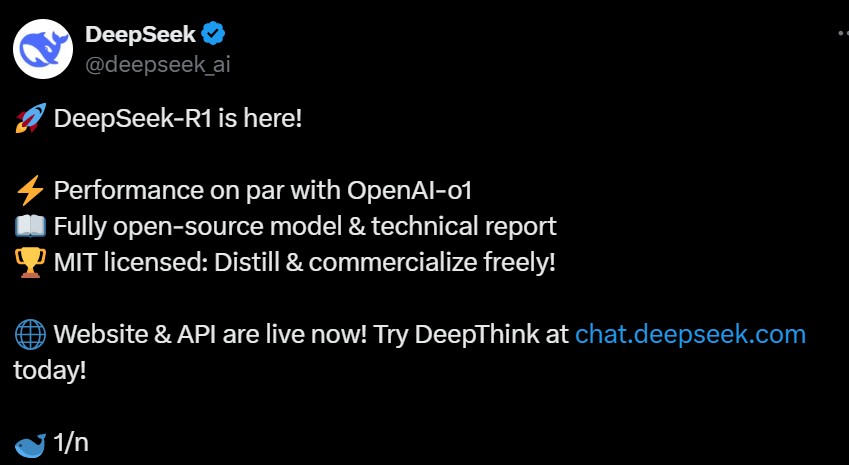
I could not find a formal announcement from DeepSeek, but did catch this Tweet, from 1/20. They have about 800K X followers.
As Tressa Robbins noted, TechCrunch and VentureBeat were amongst the first U.S. media to write about it, shortly after DeepSeek tweeted about the new model. ZDnet was also early to the game: Radhika Rajkumar wrote this story for the publication on 1/21.
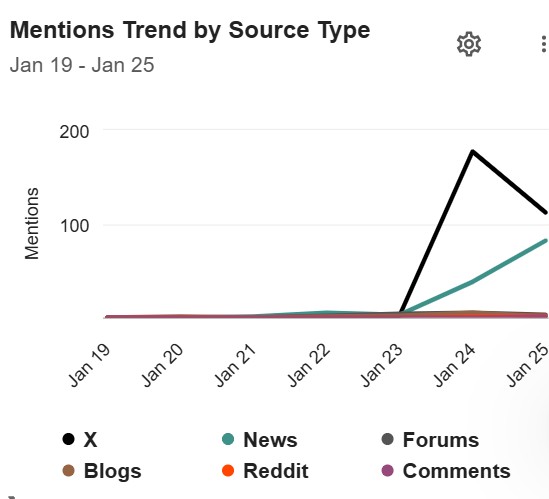
So, it seems the story simmered for a few days; social media buzz built over last weekend (when most reporters are not filinng stories). The media coverage really began to take of on January 23, as shown in the above chart from MeltWater.
I read the story. The article seemed well-researched and accurate, which pained me. While much has changed in PR, certain things stay more or less the same. Press releases, and news wire services, and PR hype, as examples.
So, let me make this bold statement. Press releases will be around for a long, long time. Further, they will likely still be hypey five years and even a decade from now, despite this fine article.
It doesn’t have to be that way. First, if you are writing boring or hypey press releases, you probably won’t get too far with journalists. And formal announcements should not be the only game or even the main focus of an effective PR prgram.
It’s not just the Press Release, it’s a Sign of the (AI) TImes
While it seems that PR hype continues to be a problem, this kind of language is not limited to press releases, or just spewed by PR people.
If you work in tech or other areas these days, you’ll notice that the tone of communications has gotten breathless and hypey over the past couple of years. Blame the AI boom and corresponding arms race. Many vendors are rushing out announcements to stay ahead of the pack, trumpeting vaporware.
There’s an abundance of tech and bold claims. This hype is a cheap attention-grab, an effort to rise above the noise; kind of like comedians that add swear words to their routines to get easy laughs.
In some ways, more hype in our discourse may not be about AI but written by AI, which generates sometimes verbose and flowery prose (see this post from Ben Guttmann’s blog: ChatGPT is full of Hot Air). Lazy marketers sadly take the easy route by using GenAI text without much editing.
We are all So Damned Happy and Cutting Edge
Paul wrote in his AdWeek piece about the overusage of clichés like “thrilled”, and “cutting edge”. Yes, this has always been true and I don’t doubt Paul’s research, whch he did by analyzing wire service PRs.
Sadly, again many in our industry continue to rely on empty hype words and trite cheeriness. While this likely won’t change much, you can give your PR program an upgrade by writing in a more interesting, clear and compelling ways.
How to do this? Read Ben’s book for starters.
Is It a Problem?
Accorudng to Paul’s article:
While the majority of journalists say they appreciate receiving press releases… just over half would cut off contact with a PR professional for sending a pitch that sounds like a marketing brochure.
Paul Hiebert, AdWeek
So, yes, I’d say it is a problem.
What Can be Done?
“Yet another method, though difficult, is to refuse to publish a news announcement if there’s no news to share,” the writer advises. I think the problem here is equating press releases with a PR program; and as the only ways to convey updates and share your news, commentary and stories.
There are other ways. The old saying: The Medium is the Message applies here. The press do like to get updates, and packaging the info into a PR says that it is news.
Use them when they make sense; but don’t be afraid to shake up the formula and try other tactics to accomplish your communications goals.
Generating Excitement Without Hype
Through my years in PR, I’d sometimes get feedback from clients: “punch up that press release. Make it more exciting.”
What they generally mean is add more shameless promotion AKA chest beating AKA hype. After all, if the client is excited abouit their news, why isn’t the PR team? And why are they sending us a draft that reads like a news article vs. a sales sheet?
Bingo! The more the news resembles a real article, delivered in a credibe and rational way, the better the chance that the media will take it seriously (and hopefully do something with it).
Does this mean you shouldn’t even try to generate excitement, show enthusiasm for the news? That is the needle we need to thread, and there are ways to do this short of empty hype.
The article mentions one idea:
Don’t make a claim; substantiate one. If you’re saying we have a revolutionary chip, wouldn’t it be better to say we’ve just introduced a new chip that’s 80% faster than anything else on the market?
Anthony D’Angelo, Newhouse School of Public Comm.s at Syracuse U.
In other words, trot out hard numbers, defensible superlatives vs. qualitative claims.
Other ways? How’s about third party validation via customer, partner or analyst quotes? It’s always better to have someone else sing your praises.
It is interesting to note that much of the buzz around Kamala Harris’s media blitz this week centered on her Call Her Daddy podcast appearance.
Why was this angle so hot, and what does it say about the state of the media? My go to news “splainers” Scott Galloway and Kara Swisher of The Pivot podcast had this to say on Tuesday’s episode:
Kara: With a month to go before the election, Vice President Kamala Harris is embarking on a media blitz this week. She kicked things off with an interview on the podcast Call Her Daddy, and is set to appear on 60 Minutes, The View, Stephen Colbert, and the Howard Stern over the next few days.
Most of these will be light and friendly interviews. Some will be more hard-hitting. Is this a good idea or is it too little, too late, or what’s the strategy here?”
Scott: Well, the thing that struck me about it is just that how much the world has changed in four years, where the presidential candidates’ big news event… is not that they’re going on 60 Minutes tonight, it’s that they’re going on this podcast. It really speaks to how podcasts have become such an important medium…
Kara: But will it matter for her? Because no matter how many she does, it’s not enough for the press. And the fact that she’s not doing a big New York Times interview, I think is really interesting. That to me is the most interesting is that what they’re not doing, offense.
They went on to discuss other implications of podcasting, e.g. when an author with a new book comes on The Pivot, there is a noticeable jump in book sales. They thought it would be a great idea for Kamala to go on the Joe Rogan show. Kara implied that traditional media, like the New York Times, feel sidelined and frustrated in their efforts to interview the most sought after sources.
If it sounds strange that a podcast managed to land some of the world’s highest-profile business leaders, you may not have been paying attention. In recent years, billionaires and top executives in Silicon Valley…. have started to opt out of sitting only for traditional media interviews.
Instead, they increasingly prefer to tell their own stories in the friendly spaces of podcasts and YouTube streams, where they often have more leeway to expound… on their pursuits and passions. Many of the interviews are like fireside chats…
Mike Isaacs, NY Times
The article quoted Jules Terpak, a digital culture analyst and podcaster:
“The democratization of media has allowed everyone to have a personal talk show, and now, those in powerful positions have a wide array of options to choose from when they want to get the word out to the public.”
Jules Terpak, Digital Culture Analyst
The takeaways for PR are to work pdocasts and other forms of democratized media into the mix (if you haven’t already; most in our field have, I believe).
You might also want to consider launching a CEO podcast for your employer or client. That might sound expensive, complicated and scary, but it really isn’t. Check out our podcast, PR, Done and Doner, on the topic, where Saul Marquez of marketing firm Outcomes Rocket broke it down pretty well.